
Run the retrospective
Gather what worked and what did not, including through an anonymous poll, turn it into actions and share the report.
- Plan
- All plans
- Required permission
- Sprints › EditDefault: Product Owner, Scrum Master, plus the project owner and admins.
Open the retrospective
In Sprints, click Retrospective on the card of a completed sprint. Three columns:
- What went well;
- What caused problems;
- Improvement actions.
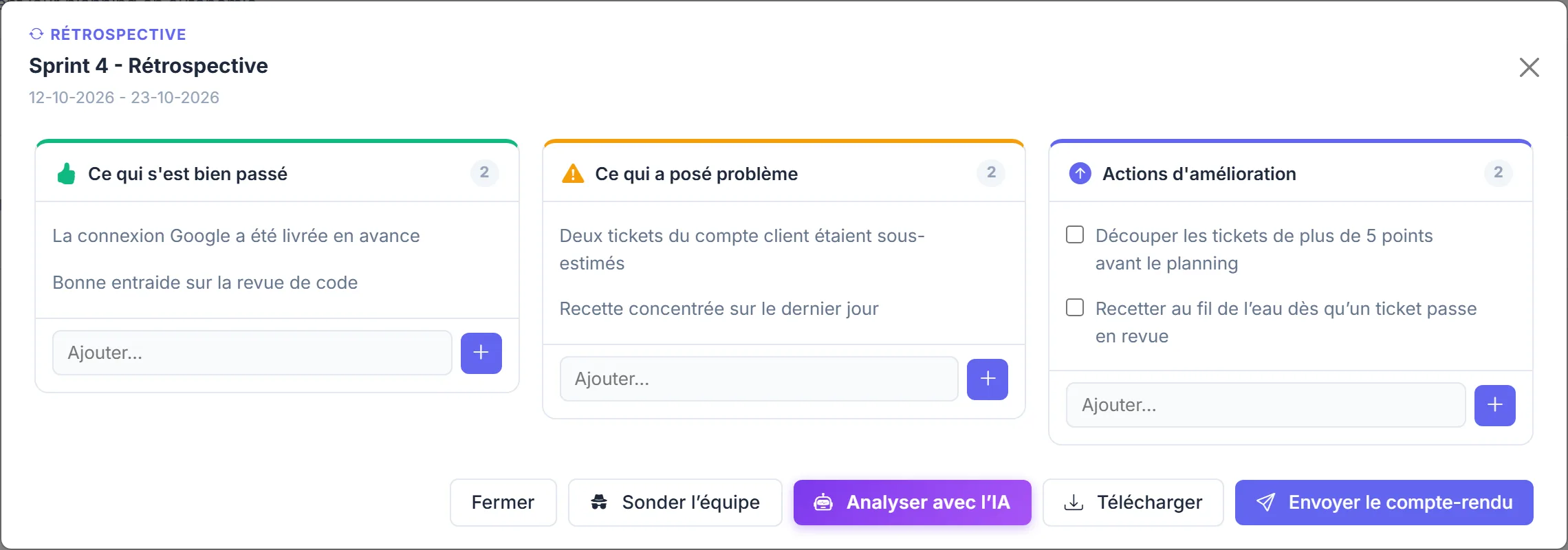
Add items directly, or let the team contribute anonymously.
Poll the team anonymously
- Click Poll the team, then Send.
- Each team member receives a personal link by email, valid for 60 minutes, which opens a contribution page. Each person can post up to 10 contributions across the three columns.
- Contributions appear in the retrospective as they come. Nobody can link them to their author.
- Click Complete to stop the poll early: all links still active are invalidated immediately.
Summary and report
- Analyze with AI groups the positives, problems and actions (AI credits).
- Send the report emails it as a PDF to the project members, except observers and PMO.
- The report can also be saved to a MyDoc page; sending it again updates the same page, whose previous state stays in the version history.
Who can open the retrospective
The retrospective requires the "Sprints › Edit" permission: by default, the Scrum Master and the Product Owner, as well as the project owner and admins. The rest of the team contributes through the anonymous poll.